The .NET Framework is a powerful software development platform built by Microsoft for creating and running Windows applications, web apps, and enterprise systems using C# and other supported languages. Understanding how the .NET Framework operates, its architecture, runtime, and class libraries, is essential for any developer working in the Microsoft ecosystem, whether you are maintaining a legacy codebase or evaluating whether to migrate to modern .NET. If you are looking to build or modernise a .NET application, Rasonix's .NET development services cover the full stack from architecture through deployment.
With Microsoft's shift toward .NET Core and the unified .NET platform (versions 5 through 9), many developers wonder how relevant the original .NET Framework remains. The short answer: it is still widely deployed in enterprise settings, fully supported by Microsoft, and worth understanding deeply, even if all new projects should target .NET 8 or later.
This guide covers the .NET Framework architecture, its key components, a clear comparison with .NET Core and .NET 5+, practical C# code examples, and honest adoption figures with sources.
What is .NET Framework in C?#
The .NET Framework is a managed execution environment that handles everything from memory allocation to security enforcement, so developers can focus on application logic rather than low-level system concerns. It was first released in 2002 and supports multiple Microsoft-backed languages: C#, VB.NET, and F#.
It has two foundational components:
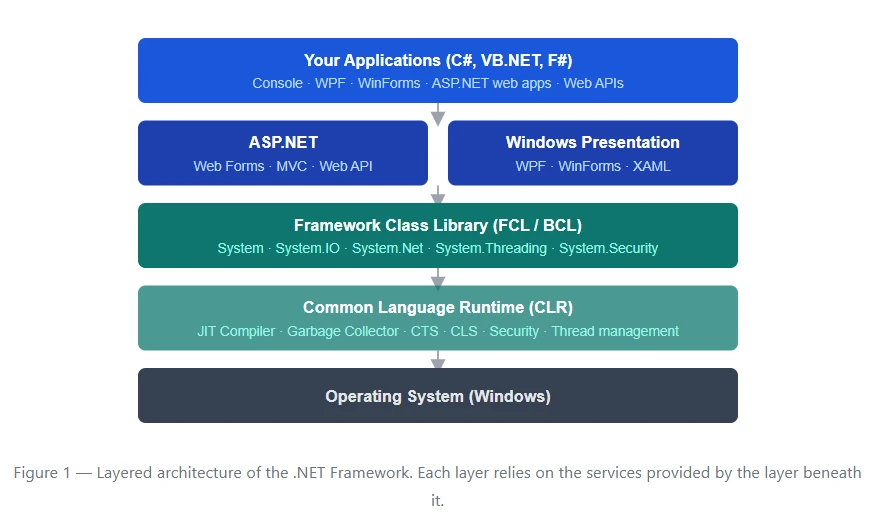
- Common Language Runtime (CLR) - the execution engine that manages memory, security, and exception handling.
- Framework Class Library (FCL) - a large collection of pre-built APIs and libraries for common tasks like file I/O, networking, cryptography, and database access.
Code written for .NET is compiled to Intermediate Language (IL) rather than native machine code. At runtime, the CLR's Just-In-Time (JIT) compiler converts IL to native code optimised for the host machine, giving .NET applications broad compatibility across Windows hardware configurations.
.NET Framework Architecture (With Diagram)
The .NET Framework is structured in layers, with each layer depending on the one below it. Here is a visual representation of that layered model:
Main Components of.NET Framework
The .NET Framework is a powerful software development platform designed by Microsoft for building and running applications on Windows. It provides a structured environment with essential components that simplify development, enhance performance, and ensure security. Understanding its main components helps developers create scalable and efficient applications with ease.
Common Language Runtime (CLR)
The CLR is the execution engine at the heart of the .NET Framework. When you compile a C# program, the compiler does not produce native machine code, it produces Intermediate Language (IL). The CLR's JIT compiler converts that IL into native instructions when the application runs, applying hardware-specific optimisations on the fly. Microsoft's official CLR documentation covers the full runtime model in depth.
Beyond JIT compilation, the CLR is responsible for:
- Garbage collection - automatic memory reclamation for objects no longer referenced, eliminating the class of bugs caused by manual memory management.
- Exception handling - a unified model for catching and propagating errors across language boundaries.
- Thread management - the
ThreadPool and Task infrastructure for concurrent and asynchronous work.
- Code Access Security (CAS) - permission-based controls on what managed code is allowed to do.
Framework Class Library (FCL):
The FCL is a comprehensive library of reusable types covering nearly every common programming need. It is built on top of the Base Class Library (BCL) - Microsoft's class library overview documents the full namespace hierarchy. Key namespaces include:
System - primitive types, math, environment accessSystem.IO - file and stream operationsSystem.Net / System.Net.Http - networking and HTTP clientsSystem.Threading - threads, tasks, and concurrency primitivesSystem.Security - cryptography and access controlSystem.Data - ADO.NET database connectivity
Common Type System (CTS):
The CTS defines how types are declared, used, and managed within the runtime. Regardless of which .NET language you write in, C#, VB.NET, or F#, the CTS ensures that a System.Int32 in C# is exactly the same type as an Integer in VB.NET. This makes cross-language interoperability possible without any marshalling overhead.
Common Language Specification (CLS):
The CLS is a subset of the CTS that defines the minimum set of features a .NET language must support to guarantee interoperability. Libraries that conform to the CLS can be consumed by any CLS-compliant language, which is especially important for third-party library authors.
.NET Framework vs .NET Core vs .NET 5+
This is one of the most-searched questions among developers evaluating the Microsoft ecosystem. Here is a clear comparison:
| Dimension |
.NET Framework (4.x) |
.NET Core (2.x / 3.x) |
.NET 5 / 6 / 8+ |
| Platforms |
Windows only |
Windows, Linux, macOS |
Windows, Linux, macOS |
| Open source |
Partially |
Yes |
Yes |
| Performance |
Baseline |
~30–40% faster |
Industry-leading |
| Deployment |
Machine-wide install |
Self-contained possible |
Self-contained / single file |
| Status |
Maintenance (no new features) |
End of life (3.1 ended 2022) |
Actively developed (LTS: .NET 8) |
| Best for |
Legacy Windows enterprise apps |
Migrate existing .NET Core apps |
All new development |
Features of .NET Framework
The .NET Framework offers a wide range of features that simplify application development and improve performance, security, and scalability. From its managed runtime environment to extensive class libraries, it provides developers with the tools needed to build reliable and efficient applications across various domains.
- Cross-language interoperability - C#, VB.NET, and F# code can call each other freely, sharing the same type system and runtime.
- Automatic memory management - the garbage collector handles allocation and deallocation; developers do not manage raw pointers.
- Rich base class library - thousands of ready-made types covering file I/O, cryptography, networking, XML, JSON, and database access.
- Managed security - Code Access Security, role-based security, and strong-name assemblies reduce attack surface.
- ASP.NET integration - built-in web stack supporting Web Forms, MVC, Web API, and Razor Pages. Rasonix builds full-stack apps using .NET + React and .NET + Angular for modern, high-performance front-end and back-end combinations.
- Rich desktop UI - Windows Forms and WPF (Windows Presentation Foundation) for building graphical desktop applications.
- Entity Framework - an ORM (Object-Relational Mapper) for database access using C# objects rather than raw SQL. See the official Entity Framework documentation for setup and migration guides.
Practical C# code examples
To further illustrate the practical application of .NET Framework concepts, consider these simple C# examples:
File I/O with System.IO
using System.IO;

string filePath = "example.txt";

// Write a file
File.WriteAllText(filePath, "Hello, .NET Framework!");

// Read it back
string content = File.ReadAllText(filePath);
Console.WriteLine(content); // Output: Hello, .NET Framework!
|
Async HTTP request with System.Net.Http
using System.Net.Http;
using System.Threading.Tasks;

async Task<string> FetchPageAsync(string url)
{
    using (HttpClient client = new HttpClient())
    {
        HttpResponseMessage response = await client.GetAsync(url);
        response.EnsureSuccessStatusCode();
        return await response.Content.ReadAsStringAsync();
    }
}

// Usage
string html = await FetchPageAsync("https://example.com");
Console.WriteLine(html.Substring(0, 200));
|
Garbage collection - understanding managed memory
The CLR's garbage collector handles memory automatically, but understanding when and how to hint at collection, and how to correctly dispose of unmanaged resources, is important for production apps. Rasonix's testing and optimisation services include performance profiling for .NET applications to catch memory leaks and throughput bottlenecks before they reach production.
// Objects are automatically collected when no longer referenced.
// You can request a collection (rarely needed in practice):
GC.Collect();
GC.WaitForPendingFinalizers();

// For unmanaged resources (file handles, DB connections), use IDisposable:
using (var stream = new FileStream("data.bin", FileMode.Open))
{
    // stream is disposed automatically at the end of this block
}
|
ASP.NET Framework & Architecture
ASP.NET is the web development component built on top of the .NET Framework. It sits between the browser and the CLR, processing HTTP requests through IIS (Internet Information Services) and returning dynamic responses. For a deeper look at how ASP.NET Core pairs with modern front-end frameworks, see our guide on why Angular and ASP.NET Core make a winning team.
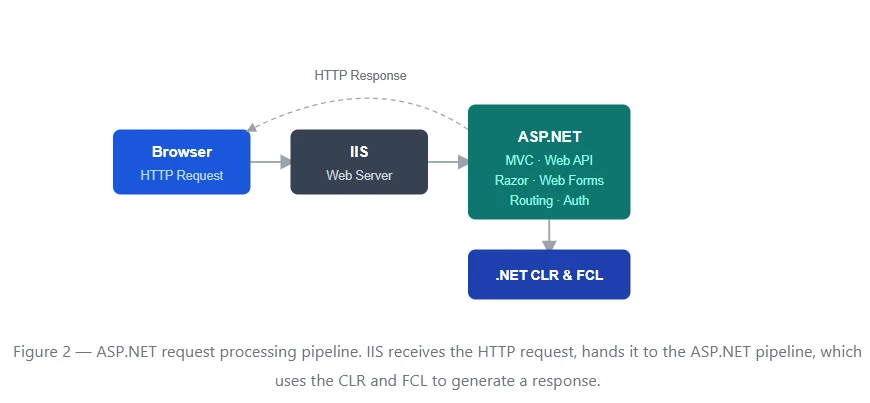
ASP.NET in the .NET Framework supports:
- Web Forms - event-driven page model similar to WinForms, best for rapid CRUD interfaces.
- MVC (Model-View-Controller) - separation of concerns for testable, maintainable web apps.
- Web API - HTTP-based RESTful services consumed by browsers, mobile apps, or other services.
- Razor Pages - a page-centric model introduced in ASP.NET Core, also available in later versions.
- Entity Framework - ORM integration for SQL Server and other databases.
Real-world adoption data
The following figures are drawn from the Stack Overflow Developer Survey 2024 and Microsoft's .NET support documentation:
| Metric |
Figure |
Source |
| C# popularity rank (most-used languages) |
Top 10 globally |
Stack Overflow Survey 2024 |
| ASP.NET Core usage among web frameworks |
~17% of respondents |
Stack Overflow Survey 2024 |
| .NET Framework versions still supported |
4.6.2 – 4.8.1 |
Microsoft .NET support policy |
| .NET 8 (current LTS) support end date |
November 2026 |
Microsoft .NET support policy |
| Performance gain (ASP.NET Core vs Framework) |
Typically 2–4× throughput |
Microsoft TechEmpower benchmarks |
Conclusion
The .NET Framework laid the foundation for modern Microsoft development and remains in active use across thousands of enterprise Windows applications. But the ecosystem has moved on. .NET 8 delivers better performance, cross-platform support, and a unified toolchain that .NET Framework was never designed to offer.
If you are maintaining a legacy .NET Framework app, the practical path forward is a phased migration: audit your dependencies, target .NET 8, and modernise incrementally rather than all at once. Microsoft's .NET Upgrade Assistant automates much of the heavy lifting. If you need expert guidance, Rasonix's custom web app development team has hands-on experience migrating enterprise .NET Framework applications to modern .NET 8 architectures. The payoff, in performance, container support, and long-term supportability, is worth the investment.
Need help with .NET development or modernisation?
Rasonix's developers handle everything from custom .NET solutions to full migrations to .NET 8 and cloud-native architectures.
Hire a .NET developer
Frequently Asked Questions
1. What is .NET Framework Framework in C#?
The .NET Framework is a Microsoft software development platform that provides a managed execution environment for building Windows applications, web apps, and enterprise software using C# and other languages. Its two core components are the Common Language Runtime (CLR) and the Framework Class Library (FCL).
2. What is the difference between .NET Framework and .NET core?
.NET Framework is Windows-only and best suited for legacy enterprise applications. .NET Core was cross-platform and higher-performing, and both were unified into .NET 5 and later versions. For all new development, use .NET 8 (the current LTS release).
3. Is .NET Framework still supported in 2026?
Yes. Microsoft continues to support .NET Framework 4.8.x for existing Windows applications. It is in maintenance mode, security patches continue, but no new features are added. Microsoft recommends .NET 8 for all new development.
4. What does the Common Language Runtime (CLR) do?
The CLR is the execution engine of .NET, it JIT-compiles your code, manages memory via garbage collection, and handles exceptions and thread safety.
5. Which version of .NET should I use for new projects in 2026?
Use .NET 8 (LTS, supported until November 2026). It is cross-platform and actively maintained. Only fall back to .NET Framework 4.x when an existing Windows application has dependencies that block migration, and even then, plan for eventual upgrade.






 Subscribe Now